OpenAEC Ecosystem
Open Infra Studio
GIS and civil design straight into your drawing, wherever in the world your project is. Choose the project location, bring in map services, OpenStreetMap and 3D city models, and design alignments, profiles and corridors. For the Netherlands, BGT, cadastre and KLIC come on top, on NLCS layers with object data and a complete drawing sheet.
International first: the worldwide tools come first, the Dutch modules sit in one group you can switch off, and the language follows Open CAD Studio's.
What is Open Infra Studio?
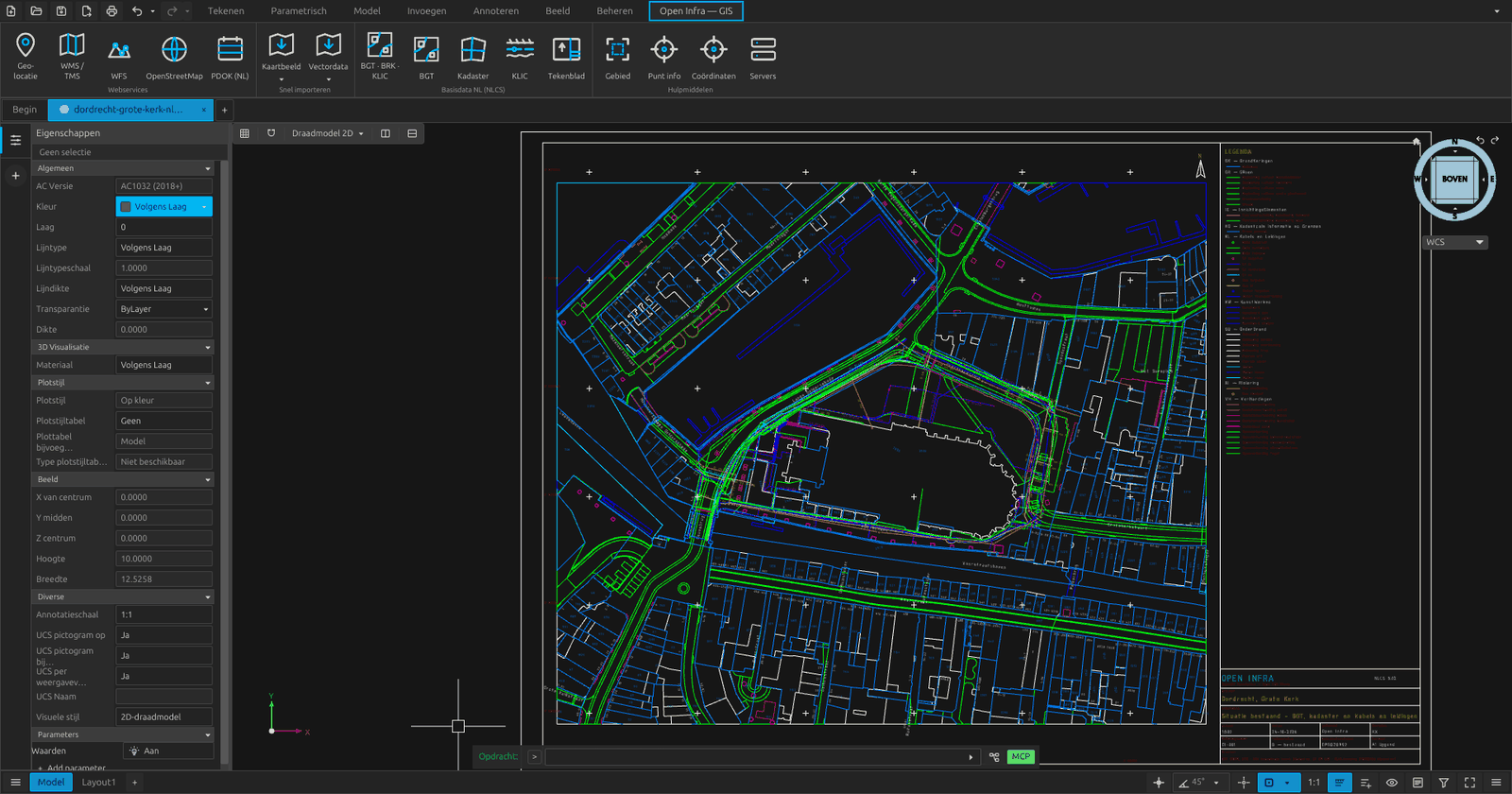
Open Infra Studio is an open-source plugin for Open CAD Studio, and a free alternative to commercial civil-CAD and desktop-GIS suites. Two ribbon tabs, GIS and Civiel, bring a project's geographic context and its civil design together in one DWG, with no export and import between programs. The GIS workbench window follows the GIS workbench we built for FreeCAD in 2020; the Civiel tab is modelled on Hakan Seven's Road workbench for FreeCAD.
Project location anywhere in the world, in any coordinate system
More than 600 checked map services in 45 countries, searchable
Civil design: survey points, TIN, alignments, profiles, corridors and earthworks
3D city models from CityGML and CityJSON, and the subsurface in 3D
BGT, cadastre and KLIC on NLCS layers, with a complete drawing sheet
The whole drawing as IFC 4.3, and scriptable with an MCP server for AI agents
Watch the video
Install
Open Infra Studio is a plugin for Open CAD Studio and comes in two parts: the GIS plugin and the Civiel plugin. Release 2026.44.5 needs Open CAD Studio v2026.43, so install or update that first.
- 1
Install Open CAD Studio v2026.43 Download Open CAD Studio from its product page, or update your installation to v2026.43, and start it.
- 2
GIS plugin through the Plugin Manager Type
PLUGINS, pick Open Infra Studio from the list, choose the release and click Install. In an older Open CAD Studio, choose Add a repository and enterOpenAEC-Foundation/Open-Infra-Studio. - 3
Unzip the Civiel plugin Download
open-infra-civiel-<platform>.zipbelow and unzip it into<config>/OpenCADStudio/plugins/. That gives the folderopenaec.open-infra-civiel. - 4
Restart Restart Open CAD Studio. The ribbon then shows the tabs GIS and Civiel.
Install by hand v2026.44.5
GIS plugin
Download the file for your system and plugin.toml, put both in <config>/OpenCADStudio/plugins/openaec.open-infra/ and restart Open CAD Studio.
Civiel plugin
Unzip the zip file for your system into <config>/OpenCADStudio/plugins/. It holds the folder openaec.open-infra-civiel with the library and its own plugin.toml. Then restart Open CAD Studio.
<config> is %APPDATA% on Windows, ~/.config on Linux and ~/Library/Application Support on macOS.
The libraries are signed: on Windows with Authenticode and a timestamp (publisher Impertio Studio B.V.), on macOS with a Developer ID and notarized by Apple, and on Linux with a detached OpenPGP signature (.asc) of the OpenAEC Foundation. The public key openaec-signing-public-key.asc is in the release; its fingerprint is 13F6D414ADEE4ED4CD09AC60601D86C93C504D29.
Release 2026.44.5, published on 29 October 2026, is built for Open CAD Studio v2026.43 (plugin API 13), like every release from 2026.44.3 on. Release 2026.44.2 and earlier are for v2026.42. Open CAD Studio only loads a plugin built against its own version, so update the plugin together with Open CAD Studio.
GIS · Civiel
Why Open Infra Studio?
An infrastructure project starts from the existing situation, and then comes the design. Usually that means switching between a GIS program and a CAD program, separate downloads, putting layers on the drawing standard by hand and retyping a title block. Open Infra Studio does it in the drawing itself: map services, open data, terrain, alignments, corridors and drawing sheets all live in the DWG.
Free and open source (GPL-3.0), built on Open CAD Studio. Every command takes arguments and returns its result as JSON, so scripts and AI agents can build whole models. The plugin runs in its own process next to the drawing, so the CAD window stays responsive while map data comes in.
Features
Map services worldwide
A built-in catalogue of more than 600 checked public WMS, WFS and tile services in 45 countries, without API keys. Search by place or theme, in other languages too, see which services cover the project location and load a layer, reprojected to the project's coordinate system.
The Civiel tab
A second ribbon tab for civil design: survey points and LandXML, a TIN with contours and height analysis, alignments with stationing, length, design and cross sections, and corridors with daylight to the ground, earthworks and a mass balance.
Export to IFC 4.3
The whole drawing as IFC4X3_ADD2. Every object gets its IFC class from its NLCS layer and object data, from terrain, buildings and pavements to cables and pipes, CPTs with their soil layers, earthworks and the corridor as IfcRoad. Axes become an IfcAlignment with horizontal and vertical layout. Georeferenced with IfcMapConversion, with object data and NLCS layer as property sets, and checked with IfcOpenShell.
CityGML and CityJSON
3D city models from anywhere: CityGML 1.0 to 3.0, CityJSON 1.x and 2.0 and CityJSONSeq. The file is reprojected to the project location and read object by object, keeping only the project area; a 97 MB city tile loads in under two seconds.
The subsurface in 3D
Cables and pipes from a KLIC delivery as tubes at their depth, or at the usual cover depth when the delivery gives none. BRO cone penetration tests and boreholes become columns of soil layers. A see-through ground shows it all from below.
Scripts and AI agents
The commands take arguments and write their result as JSON, with handles, lengths and volumes. An MCP server lets an AI agent build whole models, from project location to corridor, and finds every Open CAD Studio window by itself.
Project location
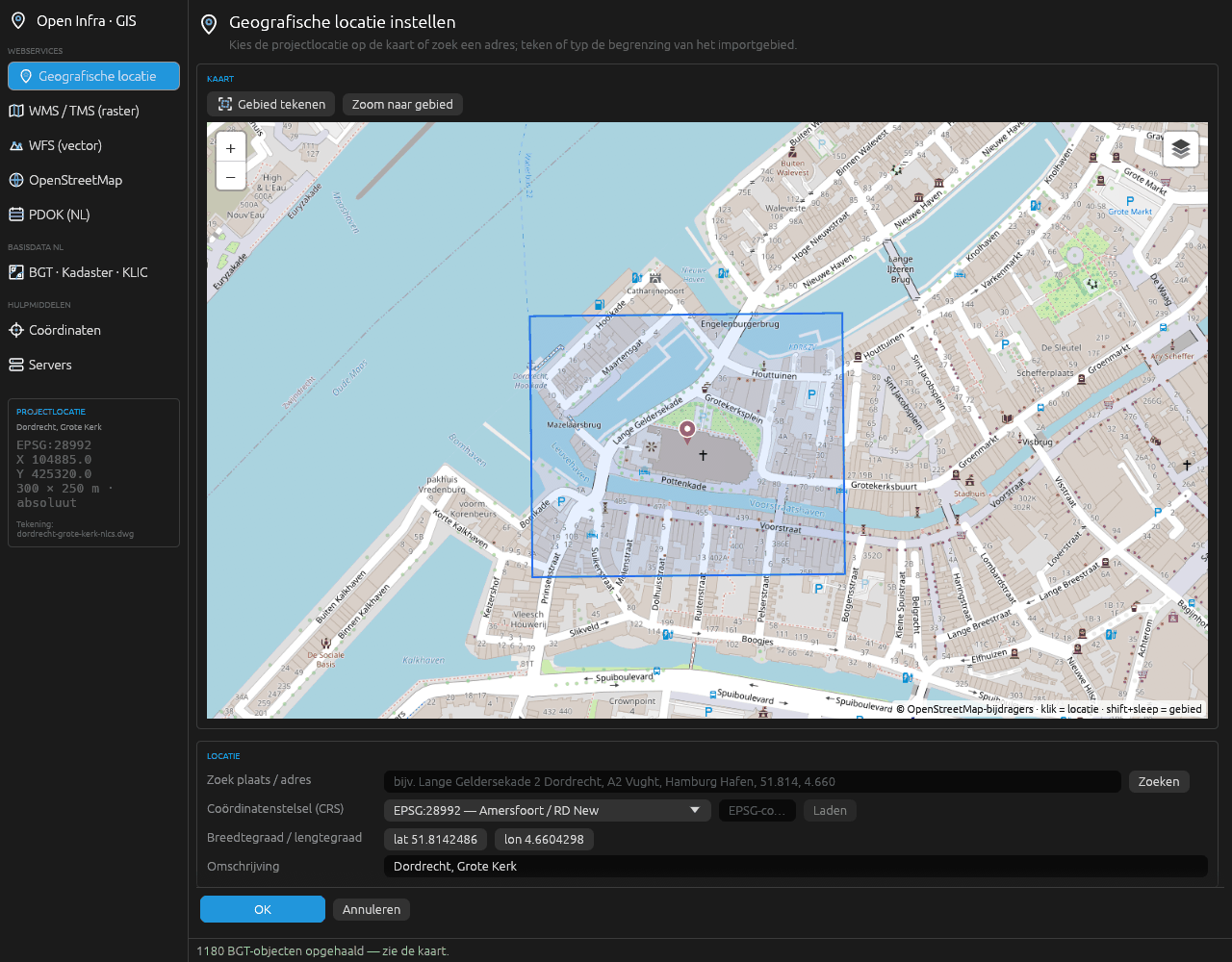
Click the map or search an address, place, parcel or coordinate pair: worldwide through OpenStreetMap, and in the Netherlands also through PDOK, with suggestions as you type. Choose the coordinate system, draw the import area and choose absolute or relative coordinates. The location is stored in the drawing itself.
Any coordinate system
14 built in, including RD New, ETRS89 / UTM, Belgian Lambert, British National Grid and Lambert-93. The right UTM zone automatically anywhere in the world, and any other EPSG code is fetched once and kept with the drawing.
Aerial photos and maps
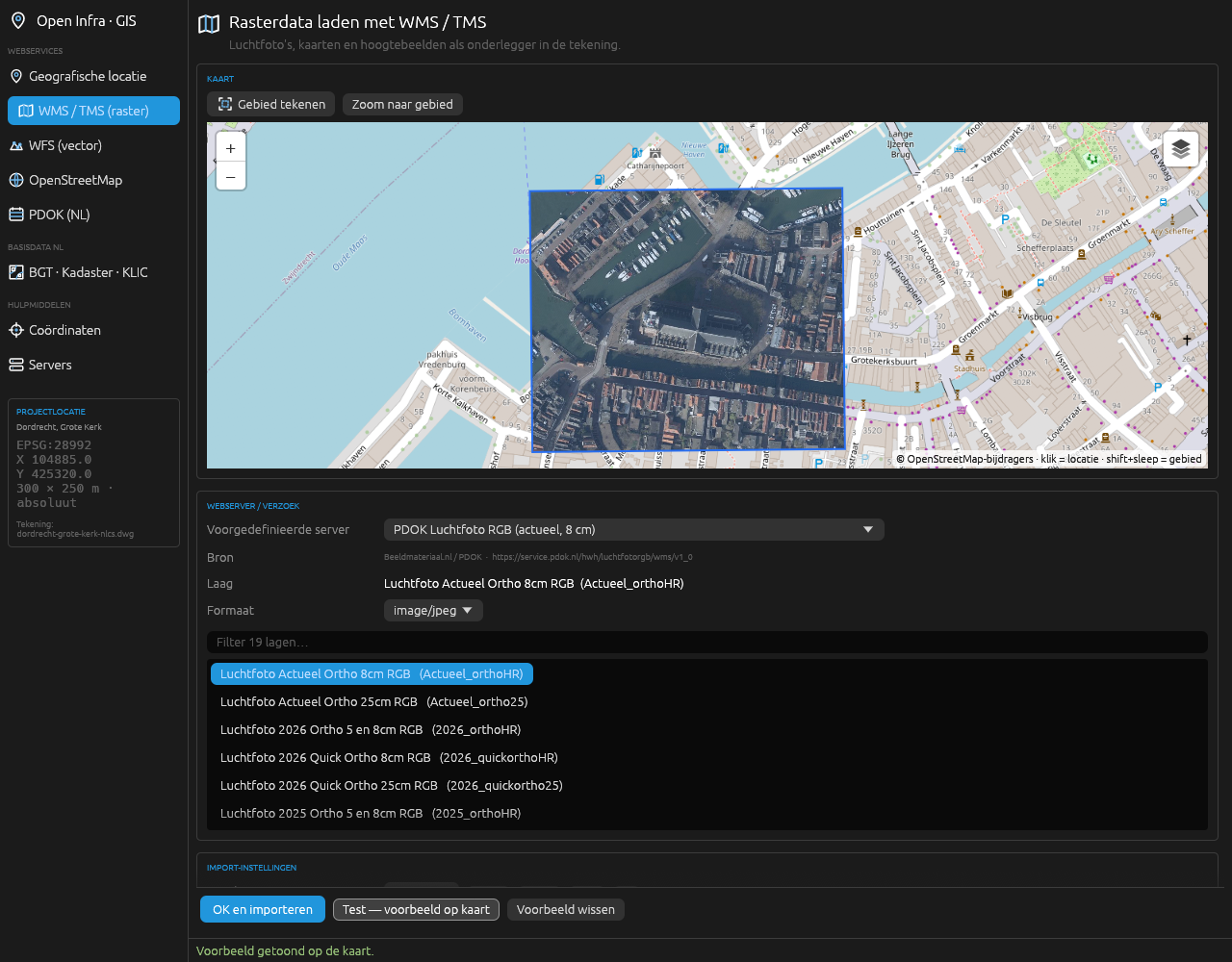
Choose a WMS or TMS server, browse its layers and preview them on the map. The images go behind the drawing as underlays. 19 server presets for the Netherlands, Flanders and the rest of the world, plus your own servers.
WFS vector data
Choose a server and a feature type, test it on the map, then choose the label attribute, the colour and clipping to the import area.
OpenStreetMap, worldwide
Buildings, roads, rail, water, civil structures, land use, cables and pipelines, fences and house numbers, anywhere in the world.
Historical maps
Every Dutch topographic map from 1815 to 2014 (Topotijdreis) and the cadastral maps of 1832 (HisGIS) as underlays, next to Natura 2000, the geomorphological map and the soil map.
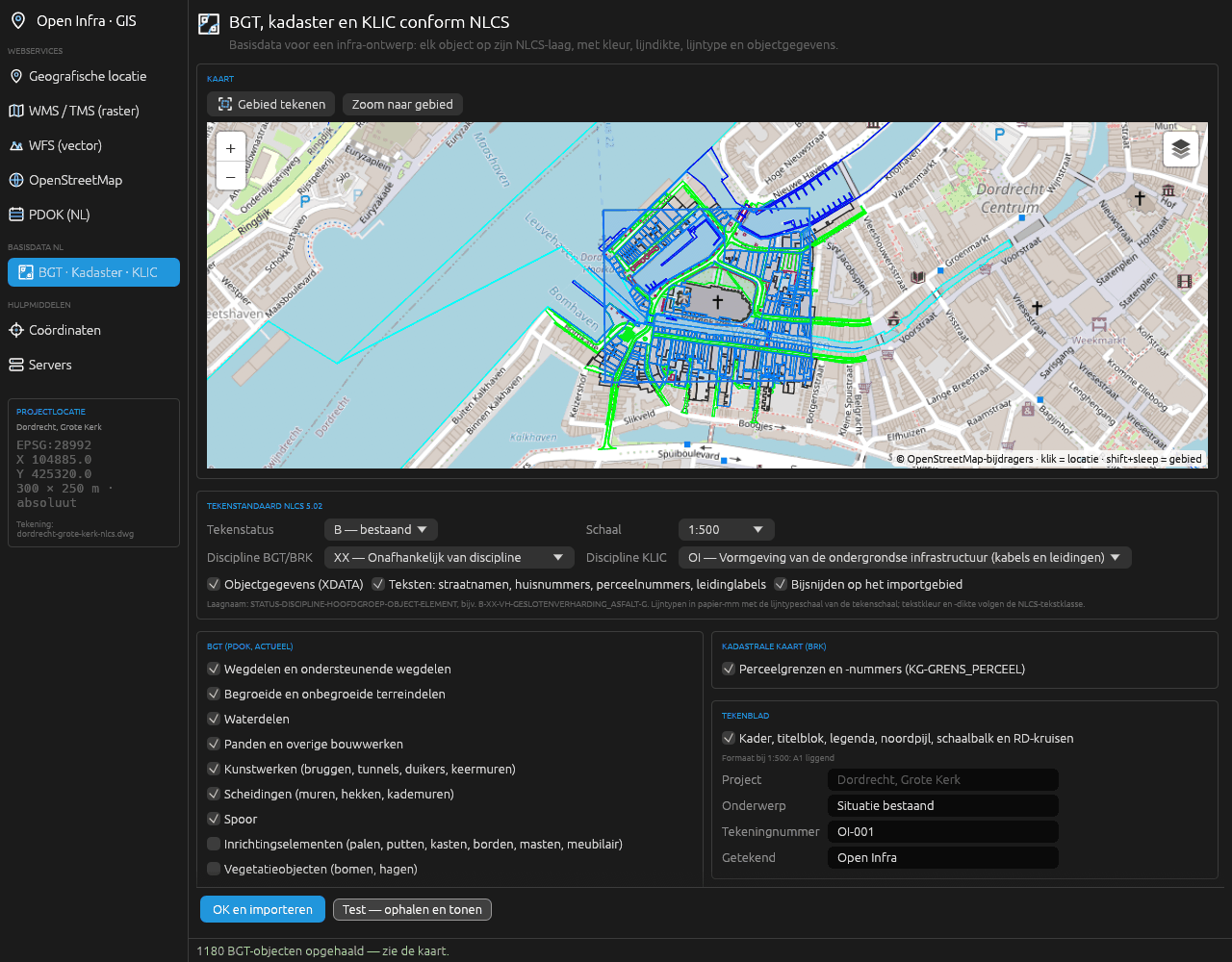
BGT to NLCS
42 PDOK collections in 11 groups, current objects only. Each object goes to the most specific rule of the official NLCS-BGT 5.0 mapping (719 rules); street names and house numbers keep their BGT rotation.
KLIC deliveries
Open the Kadaster's delivery, as a zip or as the area-information XML. 13 IMKL 2.0 themes go on their own layers, and cables and pipes are labelled per network operator with diameter and material.
Cadastral map
Parcel boundaries and parcel numbers from the BRK, the numbers at their BRK rotation, in one click on the NLCS layer for cadastral boundaries.
BGT mutation
The design on NLCS layers goes back to the BGT, as IMGeo-GML 2.1.1 with a report beside the drawing. The file is valid against the IMGeo 2.1.1 schema; anything ambiguous is listed in the report instead of exported.
NLCS 5.02 built in
3,659 objects, 543 linetypes and 256 colours. Each layer gets the NLCS colour, lineweight and linetype of the chosen drawing status; linetypes are in paper millimetres and follow the plot scale.
Drawing sheet
Frame, title block listing the sources of the imports, legend of the NLCS layers used, north arrow, scale bar and RD crosses. The format, A3 to A0 landscape, is chosen automatically.
PDOK in one click
Aerial photo, cadastral map, AHN, BAG, parcels, NWB road sections, hectometre markers, ProRail tracks and waterways, without opening a window, at the saved location.
Object data
Every object keeps its source attributes: from the BGT its local id, function and material, from KLIC the network operator, diameter and material.
File formats
Open CAD Studio itself opens and saves the drawing (DWG and DXF, R13 to 2018) and plots it to PDF. Open Infra Studio adds the formats below. Imported files are reprojected to the project location, using the file's own coordinate system where it has one.
Open
- Vector GIS GeoJSON, Shapefile, GeoPackage, KML and KMZ, GPX, GML, and CSV, TXT or TSV with coordinate columns
- Rasters and height grids GeoTIFF, ASCII grid (.asc), JPEG and PNG with a world file
- Point clouds LAS and LAZ
- Survey points and LandXML PNEZD, PENZD, NEZD and ENZD; LandXML 1.x with points, surfaces and alignments
- 3D city models CityGML 1.0 to 3.0, IMGeo/BGT GML, CityJSON 1.x and 2.0, CityJSONSeq
- KLIC delivery IMKL 2.0, as a zip or as XML
Write
- IFC 4.3 the whole drawing as IFC4X3_ADD2, through GIS → Output → IFC 4x3 or Civiel → 3D model → IFC 4x3 on the ribbon, with
GIS_IFCorCIV_IFC [BESTAND=] [SELECTIE] [TEKST=nee], or with the MCP toolifc_export - Map images and point clouds PNG beside the drawing; point clouds as .rcs, attached to the drawing
- Tables survey points, the mass balance per corridor and quantities as CSV, quantities also as a table in the drawing
- BGT mutation IMGeo-GML 2.1.1 with a report
- NLCS check a report in Markdown
- Command results JSON per call, for scripts and agents
Web services
- Maps WMS 1.1.1 and 1.3.0, XYZ and TMS tiles, and tile caches such as Topotijdreis's
- Vector data WFS 1.1.0 and 2.0.0, OGC API Features, the Overpass API for OpenStreetMap
- Heights and 3D WCS for height grids, COPC for point clouds, the 3D BAG API
- Other BRO REST for cone penetration tests and boreholes, address search through PDOK and Nominatim, epsg.io for coordinate systems
Not yet: reading JPEG 2000, E57, PLY and IFC, and exporting to LandXML, GeoJSON, Shapefile or GeoPackage.
Five commands, one drawing
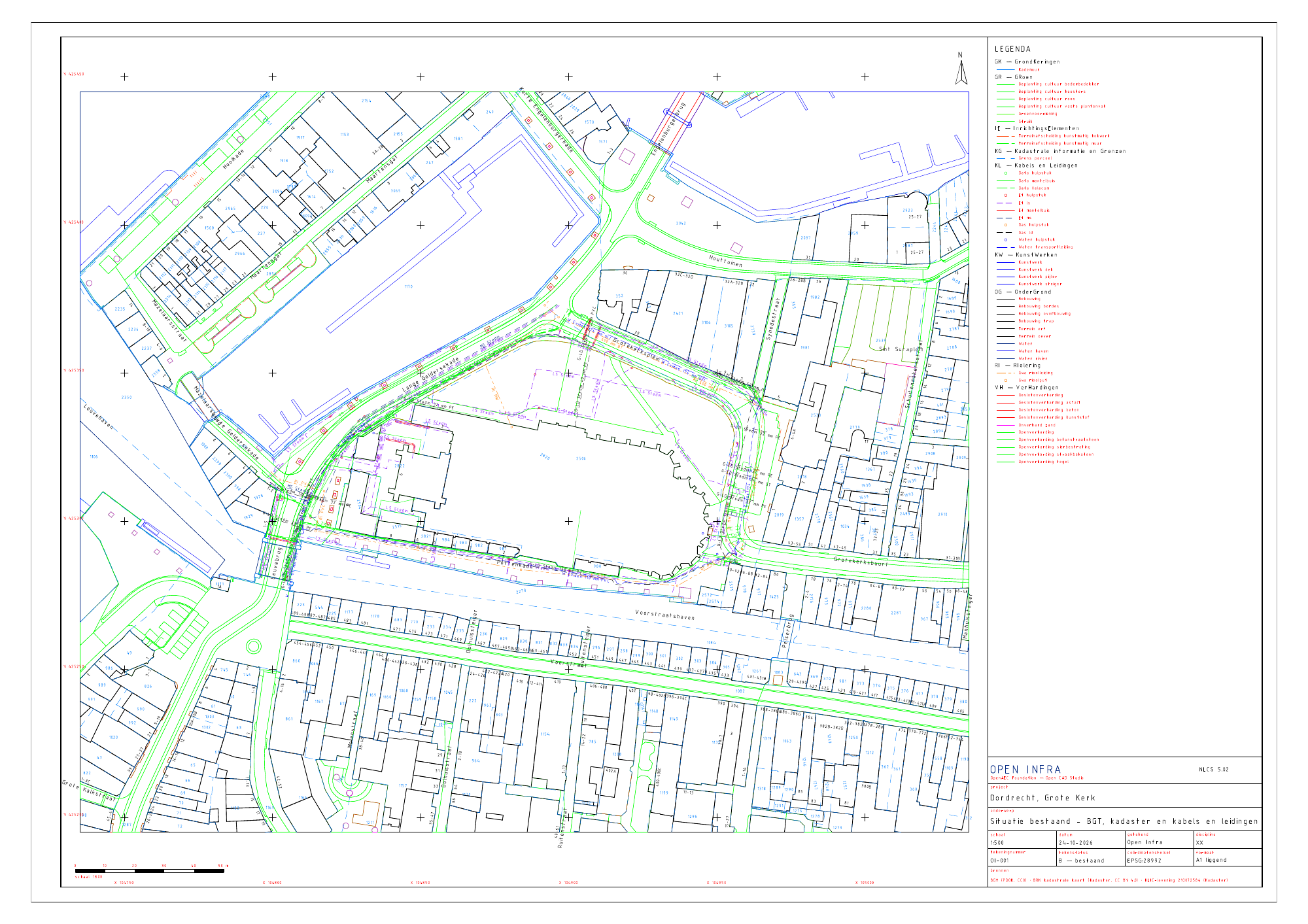
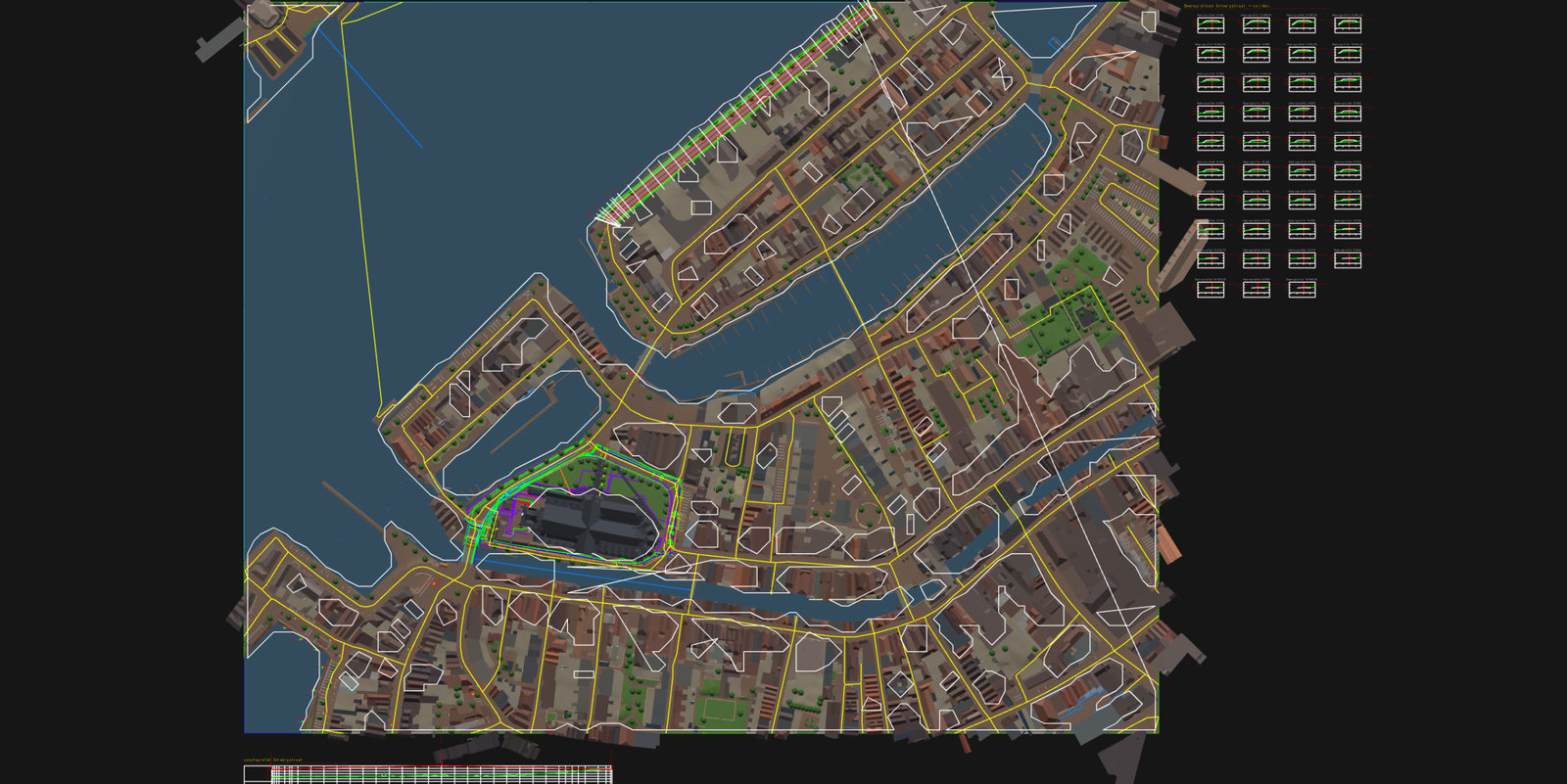
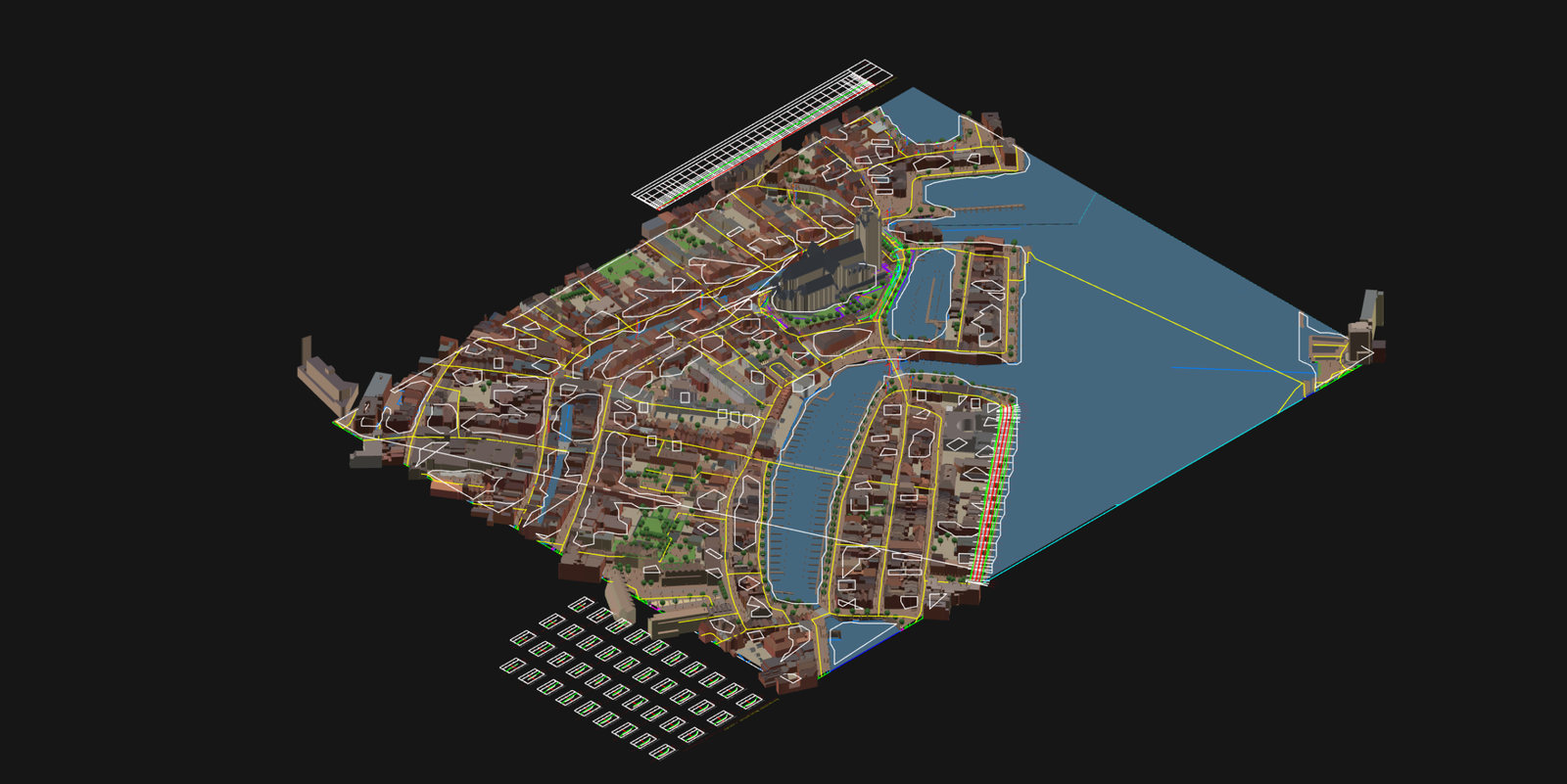
The existing situation around the Grote Kerk in Dordrecht: 300 by 250 metres in RD, on an A1 sheet at scale 1:500. Made in an empty metric drawing with these five commands.
GIS_SITE RD 104885 425320 300 250 Dordrecht, Grote Kerk
GIS_Q_BGT
GIS_Q_BRK
GIS_KLIC_IMPORT <pad>/Levering.zip
GIS_TEKENBLAD Situatie bestaand- Entities3.439
- From the BGT1.242
- From the cadastre1.328
- From the KLIC delivery632
- NLCS layers68
- With object data3.202
- DWG file0,7 MB
Example model Dordrecht
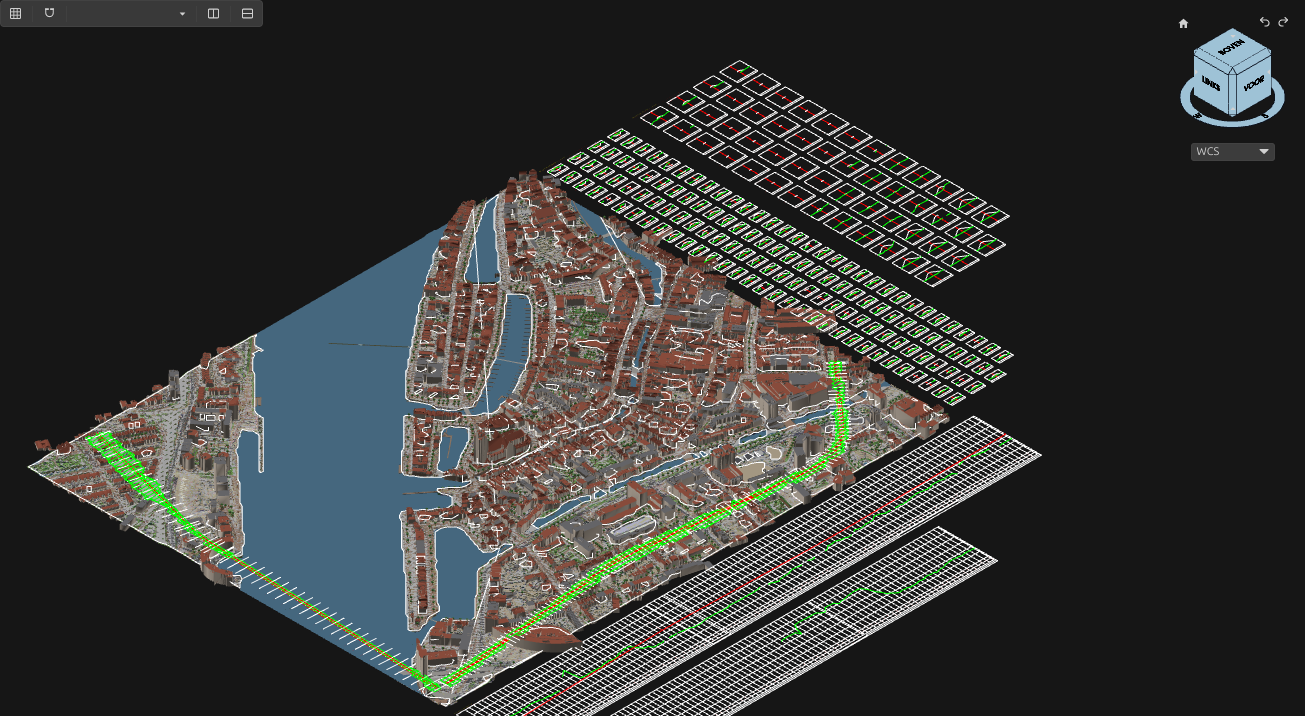
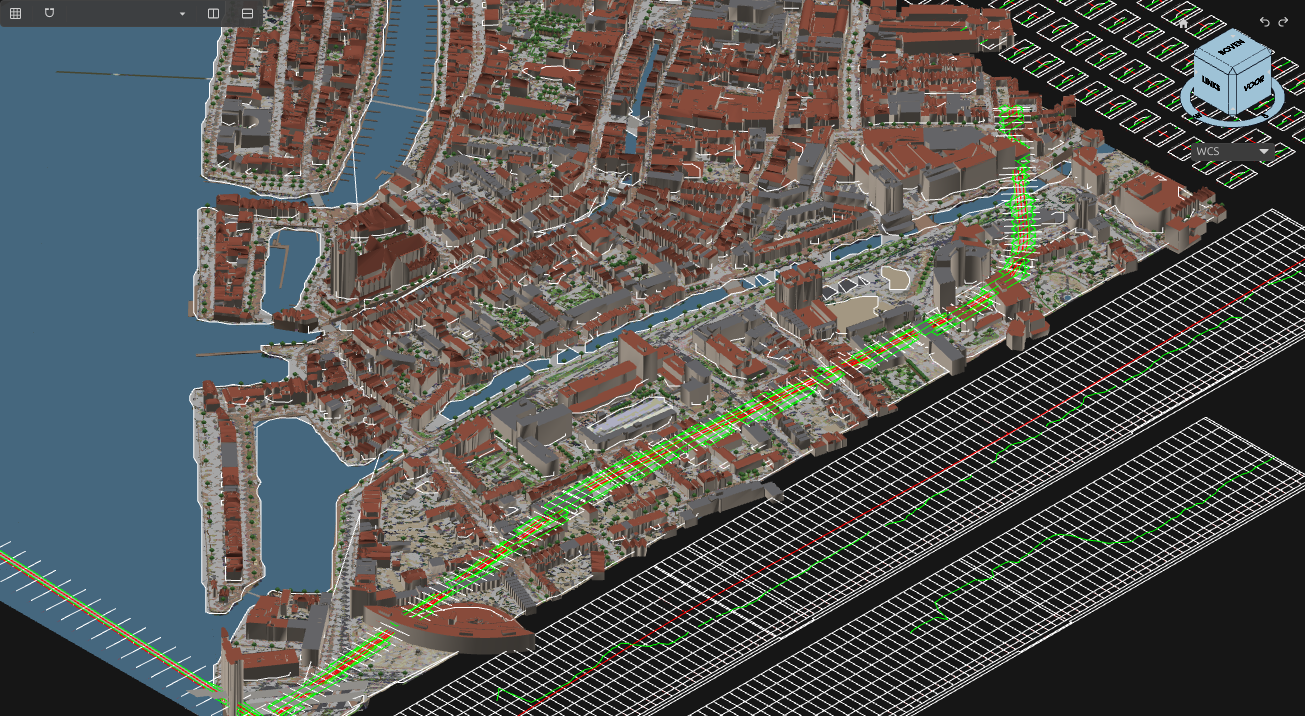
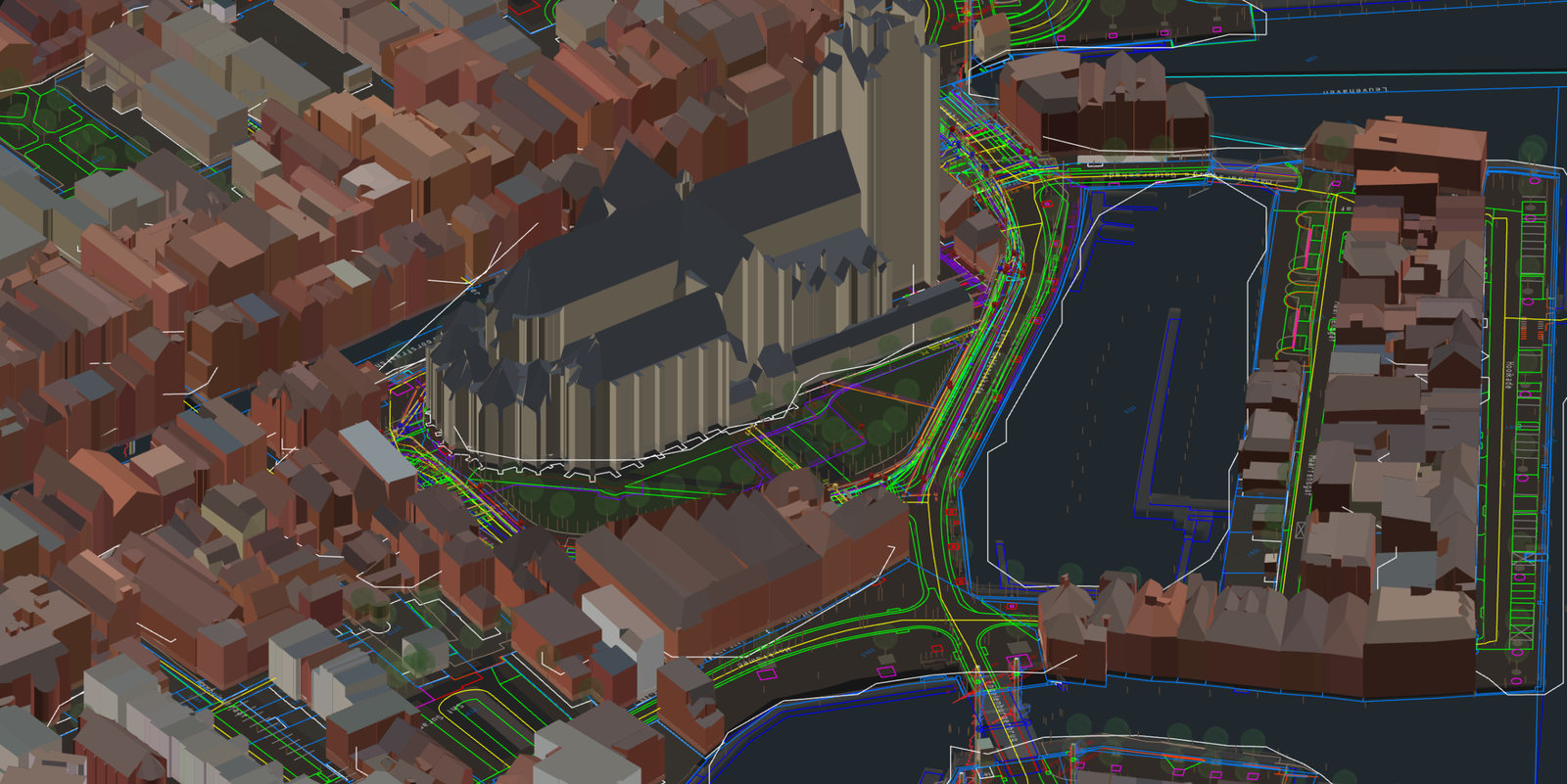
Dordrecht city centre around the Grote Kerk, 700 by 560 metres, in one DWG with the plan and the 3D model. The plan has the BGT, the cadastre and a KLIC delivery on NLCS layers. The 3D model has the BGT in 3D, the buildings from the 3D BAG, the cables and pipes in 3D, CPTs and boreholes from the BRO, and a street design with an axis, profiles and a corridor. The same drawing comes as IFC 4.3 too. Everything was made with release 2026.44.5 in Open CAD Studio v2026.43, by a script that is in the folder.
The ifczip file unzips to dordrecht-3d.ifc (64 MB); many IFC viewers also open it without unzipping. The DWG opens in Open CAD Studio v2026.43.
- Area700 × 560 m
- BGT objects5.057
- Buildings from the 3D BAG1.191
- Cables and pipes in 3D407
- Appurtenances and manholes as columns131
- CPTs and boreholes25 + 2
- Objects in the IFC 4.320.067
Good to know
- RD accuracy. Conversion to RD uses the 7-parameter transformation, about 0.2 metres from RDNAPTRANS. That is enough for underlays and context. For setting out, use data that is already in RD; PDOK, BGT, BRK and KLIC all supply it that way.
- macOS. The ribbon quick buttons and the commands work; the workbench window does not yet.
- Open CAD Studio version. Release 2026.44.5 belongs to Open CAD Studio v2026.43. A plugin for v2026.42 does not load in v2026.43, and the other way round. When you update Open CAD Studio, update the plugin too.
- Language and Dutch modules. The interface is in English or Dutch and follows Open CAD Studio's language, falling back to English. Next to the language choice you can switch off the Dutch modules; after a restart the Netherlands group and the 3D Netherlands menu are gone from the ribbon.
- Sources and licences. Data from PDOK, the Kadaster, Rijkswaterstaat, ProRail, AHN and the BRO is open data; credit the source, which the title block does for the imports. NLCS and the 3D BAG are CC BY 4.0, OpenStreetMap is ODbL. The Sentinel-2 satellite background is for non-commercial use only.
Technology
About 29,000 lines of Rust and 120 unit tests, in one Cargo workspace with two plugins. A core with no dependency on the CAD host handles coordinates, servers, parsing and the civil calculations; a separate layer turns the result into DWG entities. Builds for Windows, Linux and macOS.